


Wells Fargo Mobile®
4.8339.27K Reviews
App Specs
- Version
- 26.06.04.1122
- Updated On
- License
- Free
- Downloads
- 10,000,000+
- Developer
- Wells Fargo Mobile
- Categories
- Finance
- Platform
- Android, iOS
Screenshots
 Analysis by AppCompare
When a banking app becomes part of my routine, convenience is only half the question; I also want to know what I can check and control before making a sensitive decision. Wells Fargo Mobile® is Wells Fargo’s finance app for accessing bank and investment accounts. It is free, rated for Everyone, and developed by Wells Fargo Mobile. Its long presence in app stores and broad audience make it familiar, but I still judge it by the practical work it lets me do and by how carefully I use it.
Trust starts with clear expectations
I see this app as most useful for people who already bank or invest with Wells Fargo and want a mobile route to those accounts. It is not a substitute for choosing a bank, comparing account terms, or getting personal financial advice. Before signing in, I would make sure I am using the official app-store entry and the credentials I use for Wells Fargo online banking. That small check matters more than assuming that a familiar name alone makes every sign-in prompt safe.
The app has a 4.8 average from around 2.8 million ratings, with over 10 million installs. Those figures suggest that many people use it, not that every feature will suit every account or that any individual transaction is guaranteed to be trouble-free. I find that distinction useful: popularity can help me understand that an app is established, while my own careful review of account details remains essential.
What I would check before a sensitive action
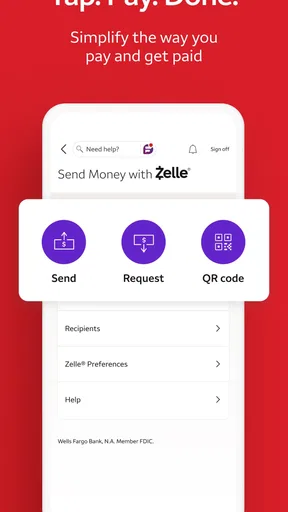
For a balance check, the decision is simple; for a transfer, bill payment, or deposit, I slow down and confirm the account and amount before proceeding. A phone makes routine tasks quick, but that speed can also make it easy to tap through without noticing a wrong recipient or an unexpected figure. My practical rule is to treat the final review screen as a real checkpoint, not a formality.
The original convenience of fingerprint or facial recognition can reduce sign-in friction where that option is available on the device. I would still keep my device’s own lock enabled and avoid signing in on a phone I do not control. Biometrics make access easier; they are not a reason to share a device, leave it unlocked, or ignore the details of a transaction.
Use alerts as prompts, not guarantees
Balance, activity, and due-date alerts can help me notice something that deserves attention, especially when I am juggling bills or watching a checking balance between paydays. I would choose notifications that are useful to my routine and check the app itself when a message calls for action. An alert is a prompt to verify what is happening, not a replacement for reviewing the account or confirming that a payment went through.
Financial information is sensitive, so I also think about the moment and place where I open it. If I am in a crowded setting, I can wait until I have a little privacy before looking at balances or entering payment details. That is a simple user choice rather than a claim about the app’s privacy settings, and it helps keep everyday banking deliberate.
Worth Reading Before You Choose

Baby Panda World Brings Quick Play to Modern Phones, but Its Game Library Feels Busy

ESPN’s Live Game View Makes Following Close Games Easier

QuizzLand Review: A Good Fit for Short Trivia Breaks, Not Every Player

Basketball Stars: Multiplayer Is Fast, but Can It Recover When Matches Go Wrong?

WEBTOON Turns Phone Updates Into a Better Reading Routine

Link to Windows Runs on Shared Habits, Not Social Feeds
Getting Started
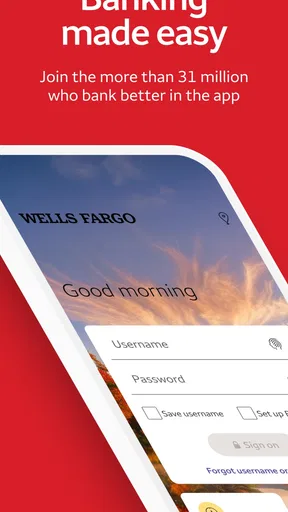
First things first, downloading Wells Fargo Mobile® is a breeze. Just hop onto the App Store or Google Play, search for the app, and hit download. Once you open it, the app guides you through a straightforward setup. You’ll need your online banking credentials, so make sure those are handy.
The interface is clean and intuitive. You don't need to be a tech wizard to navigate through it. Everything is laid out in a way that just makes sense. From checking your balance to transferring funds, it's all a tap away. It even uses fingerprint or facial recognition for quick login, which I personally find super convenient.
Features that Matter
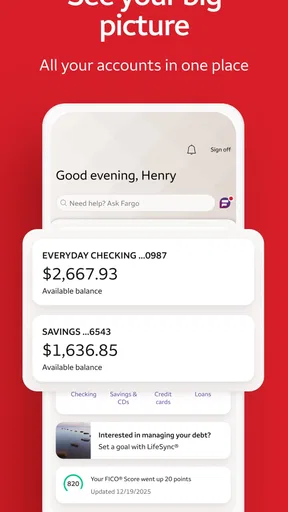
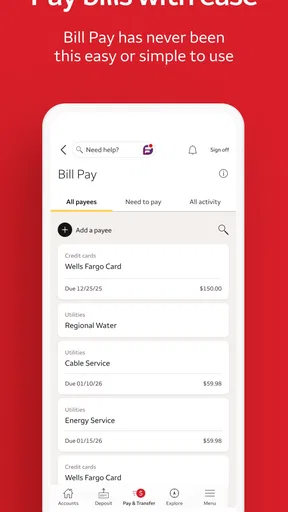
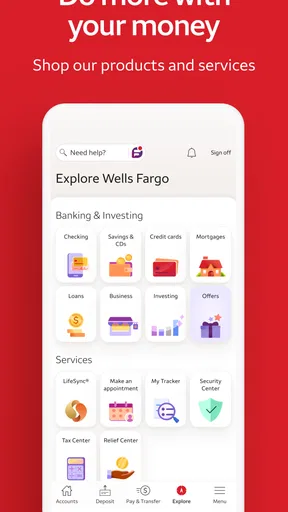
What sets this app apart? Well, it’s packed with features that cater to your everyday banking needs. You can check all your accounts in one place, whether it’s savings, checking, or credit cards. Need to pay a bill? Easy peasy. The app lets you do it with just a few taps.
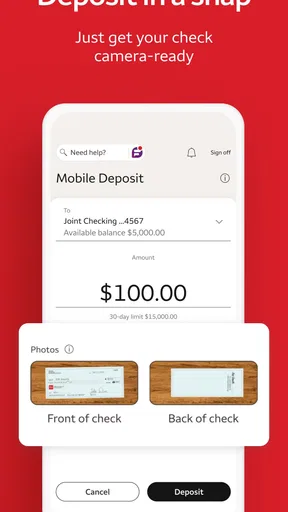
The mobile deposit feature is a lifesaver. Snap a photo of your check, and voila, it's deposited. No more running to the bank on your lunch break. And if you’re concerned about security, rest easy. The app implements robust security measures to keep your information safe.
Choosing the right moment to use it
A realistic use case is checking your available balance while planning a grocery run, then reviewing an upcoming bill before deciding how much to move between accounts. I find that sequence more useful than opening a finance app just to browse: it connects a specific decision to the information needed for it. Before confirming a payment or transfer, I would pause to recheck the destination and amount, especially if I am in a hurry.
Mobile deposit is another good example of convenience with a little responsibility attached. It can save a trip when I receive a paper check, but I would take the photos in good light, make sure the details are legible, and follow the instructions shown in the app. I would also keep the paper check until I am comfortable that the deposit has been handled, rather than treating a submitted photo as proof that every step is complete.
Where it fits among banking options
Compared with visiting a branch or using a desktop banking site, a phone app is better for quick checks and tasks I can complete while away from home. A desktop can be more comfortable when I want a larger screen for reviewing several details, while a branch is the better choice when I need in-person assistance. This app’s appeal is its access to Wells Fargo accounts in a mobile setting, not a reason to expect every banking need to be solved on a phone.
It is also different from a budgeting-first app. Wells Fargo Mobile is centered on access to Wells Fargo banking and investment accounts; someone seeking a broad view of accounts held at several financial institutions may prefer a tool designed for that purpose. I would not switch to a separate service just for a quick balance check, but I would compare options if cross-institution tracking is the main job I need done.
Small habits that make mobile banking smoother
One useful habit is to separate looking from acting. I can check a balance first, decide what I need to do, and only then start a payment or transfer. That reduces the chance of making a transaction simply because the relevant button is already on screen. For recurring bills, reviewing the due date and payment details before submitting also helps me catch changes in timing or amount.
Another practical trade-off is convenience versus screen size. A phone is excellent for a quick task, but a small display can make long account details or multiple figures harder to compare. If something looks unfamiliar, I would take the time to open the relevant account information carefully or use a larger screen rather than guessing from a glance. That is especially sensible for a transfer or an investment-related decision.
Keep Track on the Go
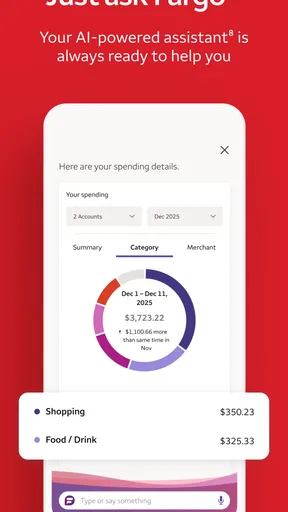
Budgeting is a cinch with Wells Fargo Mobile®. The app provides useful insights into your spending habits. You can set up alerts for low balances, unusual activity, and due dates, so you're always in the loop. It's like having a personal finance assistant who never sleeps.
Plus, if you’re traveling or just out and about, the app’s location feature helps you find the nearest ATM or branch. No more wandering around in search of cash or assistance.
Who will appreciate it—and who may not
I would recommend it first to an existing Wells Fargo customer who regularly checks accounts, pays bills, transfers money, or wants to deposit a check without planning a branch visit. The app is also a sensible option for someone who values having bank and investment account access together in a mobile routine. Its free price makes trying it straightforward for an eligible customer, though account access still depends on having the relevant Wells Fargo relationship and online credentials.
It may be the wrong fit for someone who does not bank or invest with Wells Fargo, or for someone who wants one app to organize finances across unrelated institutions. It may also be less comfortable for a person who prefers face-to-face help for most transactions or who does not want financial activity on a phone. In those cases, a branch, desktop site, or a different provider’s app may better match the way that person wants to manage money.
Version, compatibility, and practical limits
The current version is 25.12.00.36, and the minimum operating-system requirement is 10. Before installing, I would check that my device meets that requirement and that I have enough room for an app update. Keeping the app current is a sensible routine for compatibility and access, but I would still read the instructions on screen rather than assume that every feature works identically across devices or account types.
There is a learning curve if you have not used mobile banking before: you need to keep sign-in credentials secure, understand which account is selected, and distinguish a submitted request from a completed transaction. Those are not reasons to avoid the app, but they are worth recognizing. I would start with low-stakes tasks, such as checking a balance, before relying on a phone for a payment or deposit while rushed.
Final Thoughts
In a world where time is money, having the Wells Fargo Mobile® app is a no-brainer. It’s a full-service banking experience in your pocket. Whether you're a tech-savvy millennial or someone who just wants to make their banking a little easier, this app delivers.
It’s reliable, user-friendly, and packed with features that make managing your finances a breeze. So, if you’re looking to simplify your banking life, give it a whirl. You won’t regret it!
My more cautious verdict is that it is worth considering when Wells Fargo is already your bank or investment provider and mobile access would genuinely save you time. I would use it for routine account tasks, while taking an extra moment to verify payment details and choosing a private setting for sensitive checks. If you want multi-bank budgeting, prefer in-person service, or do not have Wells Fargo accounts, another option is likely a better match. For the right customer, it can make everyday banking easier without replacing the judgment that financial decisions still require.
Pros
- User-friendly interface for easy navigation.
- Secure login with biometric authentication.
- Quick access to account balances and transactions.
- Convenient mobile check deposit feature.
- Real-time alerts for account activity.
Cons
- Limited investment management tools.
- Occasional app crashes reported.
- Some features require strong internet.
- Customer service can be slow to respond.
- Not all account types supported.
FAQs for Wells Fargo Mobile®
What features does the Wells Fargo Mobile® app offer?
The Wells Fargo Mobile® app provides a comprehensive suite of banking services. Users can check account balances, view transaction history, transfer funds, pay bills, and deposit checks using mobile deposit. The app also offers personalized alerts, card-free access to ATMs, and a budgeting tool to help manage finances effectively.
Is the Wells Fargo Mobile® app secure to use?
Yes, the Wells Fargo Mobile® app employs advanced security measures to protect user information. It includes biometric login options like fingerprint and facial recognition, encryption of data, and secure sign-on technology. Additionally, users receive alerts for suspicious activities and can easily report any unauthorized transactions.
Can I manage multiple accounts with the Wells Fargo Mobile® app?
Absolutely. The Wells Fargo Mobile® app allows users to manage multiple accounts seamlessly. Whether you have checking, savings, credit cards, or loans, all accounts can be accessed and managed from a single platform. This feature provides a holistic view of your financial situation at a glance.
Does the Wells Fargo Mobile® app support mobile check deposit?
Yes, the app supports mobile check deposit, which allows users to deposit checks directly through their smartphone. Simply take a photo of the front and back of the endorsed check, and the app processes the deposit quickly. It saves a trip to the bank and is both convenient and secure.
What should I do if I encounter issues with the Wells Fargo Mobile® app?
If you experience any issues with the app, several support options are available. Users can access the in-app help section, contact customer service directly through the app, or visit the Wells Fargo website for additional resources. The app also provides troubleshooting tips for common problems.


